
Search for answers or browse our knowledge base.
-
Behaviour Scoring
-
- 1. Anxious in unfamiliar situations
- 2. Fear Of Noises
- 3. Fear of Novel Objects
- 4. Fear of Underfootings
- 5. Fear of Dogs
- 6. Fear of Stairs
- 7. Fear of Traffic
- 8. Separation Anxiety
- 9. Hyper-Attachment
- 10. Fear Of Strangers
- 11. Body Handling Concern
- 12. Retreats When Reached For
- 13. Harness Handle On Back Sensitivity
- 14. Avoidance Of Blowing Fan
- 15. Body Sensitivity To Object Contact
- 16. Anxious About Riding In Vehicles
- 17. Inhibited or passively avoidant when exposed to potentially stressful situations
- 18. Activated when exposed to potentially stressful situations
- 19. Excitable
- 20. Slow To Return To Productive Emotional State
- 21. Fidgety When Handler Is Idle
- 22. Fear On Elevated Areas, Drop-Offs Etc.
- 23. Barks Persistently
- 24. High Energy Level
- 25. Lacks Focus
- 26. Movement Excites
- 27. Chasing Animals
- 28. Dog Distraction
- 29. Sniffing
- 30. Scavenges
- 31. Inappropriate Behavior Around The Home
- 32. Lacks Initiative
- 33. Not Willing
- 34. Resource Guarding Toward People
- 35. Aggression Toward Strangers
- 36. Aggression Toward Dogs
- 37. Resource Guarding Toward Dogs Or Other Pets
- 38. Inappropriate Elimination While Working En Route
- 39. Socially Inappropriate Behavior With People
- 40. Inconsistent
- 41. Handler/Dog Team
- 42. Relationship Skills
- 43. Comparison 9 To 1 Score
- 44. Socially Inappropriate Behavior With Dogs
- 45. Thunder Reaction Prior To, During Or Immediately After A Thunderstorm
- 46. Kennels Poorly
- 47. Working Speed
- 48. Gait When Moving Out
- 49. Housebreaking Problems
- 50. Innate Desire To Work
- 51. Avoidance Of Exhaust From Vehicles
- Show all articles ( 36 ) Collapse Articles
-
-
-
Practice Videos
-
Behavior Testing
-
Database User Manual
-
-
-
- Adding a New Dog (using Manage Your Dog’s Data, MyDogs)
- Alerts
- BCL, Behavior Checklist
- Elbow Quick, Add new
- Estrus & Whelps
- Eye Quick
- Genetic Test Panel
- Genetic Test Quick
- Health Diagnoses Add/Edit
- Health History Report
- Health Normals, Add new
- Heart Quick
- Hip BVA, Add new
- Hip FCI, Add new
- Hip OFA, Add new
- Hip Penn Hip, Add new
- Photos PDFs etc.
- Private Notes
- Procedures, Add new
- Reminders
- Share my dog data to another organization
- Skin Quick
- Status History
- Weight - Entering a dog's weight
- ADI Public Access Test
- Hip Vezzoni, Add new
- Status Detail
- Edit or Change Call Name / Pedigree Name / Owner ID
- Add New Microchip / Delete Incorrect Microchip
- End Reasons
- Juvenile Estrus
- Communications Activities
- Incidents
- Creating Dog Records - What to Enter
- Creating Dog Records - Budgeting Time for Data Entry
- My Dogs Overview
- My Dogs Tabs Overview
- Show all articles ( 22 ) Collapse Articles
-
- Articles coming soon
-
-
-
-
- Alternate Therapy/Rehab
- Diagnostic Imaging, Add new / Edit or Delete
- Diet
- Elbow Quick, Add new / Edit or Delete
- Estrus & Whelps, Add new
- Eye Quick, Add new / Edit or Delete
- Genetic Test Quick, Add new / Edit or Delete
- Health Diagnoses, Add new / Edit (Update) or Delete
- Health History Report, Generate a PDF
- Health Normals
- Health Screening List
- Hip OFA Add new / Edit or Delete
- Hip Penn Hip Add new / Edit or Delete
- Hospitalization, Add new
- Kennel Tasks, Add new / Edit or Delete
- Lab, Add new / Edit or Delete
- Photos, PDFs, etc., Add new
- Reminders Add new / Edit or Delete
- Rx, Add new / Edit or Delete
- Semen Cryo, Add new / Edit or Delete
- Skin Quick Add new / Edit or Delete
- SOAP, Add new / Edit or Delete
- Status History
- Supplies Used, Add new / Edit or Delete
- Surgery, Add new
- Treatments Add new / Edit or Delete
- Vaccines Add new / Edit or Delete
- Weight and BCS Body Condition Score - Add new / Edit or Delete
- Hip Vezzoni, Add new
- Show all articles ( 14 ) Collapse Articles
-
-
-
- Client Services - Client Basic Info/ Add & Edit
- Edit Application
- Manage Team Training
- Active Graduated Team
- Chart Active Dogs By Age
- Facility Basic Info
- Active Facility Dogs
- Client Program Types and Training locations
- Order of Entry for Client Records
- Creating Client Records
- Facility Dog Applications
- Placing Dogs with Clients and Graduating Teams
-
- About People/Organizations
- Relationships
- Breeders List
- My People
- Public People & Orgs
- Updating a Dog's Foster Carer / Puppy Raiser / Breeding Host
- Managing Puppy Raiser and Breeder Host applications
- Entering Private People & Organizations
- Entering Public People and Organizations
- Foster Carer Application and Management
- Releasing Retired Dogs / Placing with Adopters
-
- Setting up your Administrator Account
- Adding More Users
- Changing User Permissions and Removing Users
- Managing List Customizations
- Customizing Regions
- Understanding the All Dogs page
- Using Searches and Reports
- Client Program Types and Training locations
- Order of Entry for Client Records
- Creating Client Records
- Facility Dog Applications
- Placing Dogs with Clients and Graduating Teams
- Creating Dog Records - What to Enter
- Creating Dog Records - Budgeting Time for Data Entry
- My Dogs Overview
- Preparing to Enter Foundation Breeders and Ancestors
- Claiming Records of Your Dogs Already in IWDR
- Adding Foundation/Ancestor Records
- Adding Foundation/My Dog Records
- Health Clearances for Foundation Breeders
- My Dogs Tabs Overview
- Entering Private People & Organizations
- Entering Public People and Organizations
- Creating Litter Records
- Overview of Estrus and Breeding
- Entering Juvenile Estrus/Puppy Heats
- Litter Tracking
- Breeder Host and Care
- Vet Care
- Foster Carer Application and Management
- Releasing Retired Dogs / Placing with Adopters
- Show all articles ( 16 ) Collapse Articles
-
-
Early Socialization
-
- Video - Coat Desensitization
- Video - Novel Objects
- Video - Trolley Ride with Mom
- Early Puppy Socialization - Novel Objects video
- Early Puppy Socialization – Novel Sounds video
- Early Puppy Socialization – Introducing New Environments video
- Early Puppy Socialization – Motor Development, Balance, Coordination, Proprioception video
- Early Puppy Socialization – Passive Environmental Enrichment in the Den video
- Early Puppy Socialization – Stairs
-
-
Genetic Selection & Inbreeding
-
- What are EBVs and how do they help?
- How EBVs are calculated
- What is needed to calculate EBVs and EBV accuracy?
- Using EBVs effectively
- Selection index
- Why are EBVs different for littermates?
- Presentation Recording: Improving behavior using EBVs
- Presentation Recording: Using EBVs successfully
- Presentation Recording - Improving health using EBVs
-
Webinars
-
Reproduction
-
Organization Management
Enter New Whelp
0 out of 5 stars
| 5 Stars | 0% | |
| 4 Stars | 0% | |
| 3 Stars | 0% | |
| 2 Stars | 0% | |
| 1 Stars | 0% |
To begin entering a whelp, an estrus & mating must have already been entered. (See section…)
1. Click [Estrus, Puppies, Breeding Colony] and select [Enter New Estrus & Whelp] OR select [Estrus & Whelps] from home page
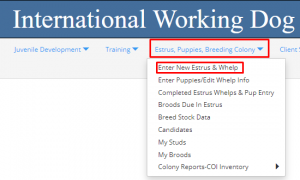 OR
OR 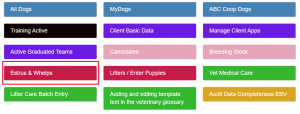
- Click [Edit] icon
 in the row of the Estrus / Dam you wish to enter Whelp details on.
 - Enter Whelp Date – scroll down to below the pink column, using calendar icon or using drop down menus for day, month, and year.
Enter the date the first puppy was born. All puppies after will have the same birthdate, regardless of if they carry over into the next day.
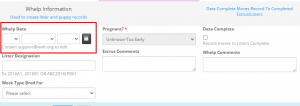
- Enter Litter Designation – (See section…).
With the large number of IBC litters born, to track appropriately it is important the Litter Designation of each litter is entered correctly. The sequence of the following litters born afterwards will carry on from the previous litter and so on. Organizations can also choose to have their own litter designations and track their own litters this way.
‘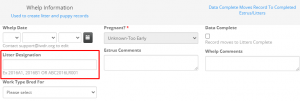
When recording IBC litter designations…
a. First enter the region (ABC, EBC, OBC) the litter is born in
b. Followed by the year (4-digit) the litter was born
c. Insert a 2-digit breed code for the corresponding breed (i.e., Labrador Retriever = LR, Golden retriever = GR, Labrador/golden cross = LG Labrador Bernese cross = LB)
d. Enter a 3-digit number, the numerical placeholder is 3 digits (e.g., 030 rather than 30). This is done to accommodate up to 100+ litters in a year. (The 3-digit number entered should be the next number in the sequence from the Litter Designations ‘Litter List’. See below on where to find that.) Number sequence should continue its numerical order regardless of the breeding code entered. For i.e. ABC2021LR026 then the next number, even if a different breed would be ABC2021LG027.
e. Organizations can choose whatever combination of letters and numbers desired for their own colony.
f. When entering both IBC and individual organization litter designations, they will need to be separated by a semicolon. We need the semi colon to separate the two so that we can search on each ID. As well, the IBC designation should always show first, followed by the organization’s designation. A correct entry will look like this, with both designations: ABC2021LR048; PADS2021LR139
To locate the previous Litter Designations…
a. While in [New Estrus & Whelps], in the row (Dam) selected, click on Show Details Icon

b. Find the Litters List; ABCLitters List, EBCLitters List, or OBCLitters List, depending what region you are in.
c. Find the column titled [Litter], look for the last designation entered. Typically, the litter designation number at the top is the most recent litter/highest number, but that may not always be the case. So, ensure you look at the full list to determine the highest number. Your litter will be the next number in the sequence, so you would enter the next appropriate letter and number combination in the record you are editing (your litter).
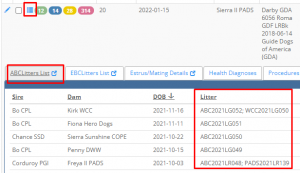
d. Please contact an IWDR Associate Facilitator for help with this if you have questions.
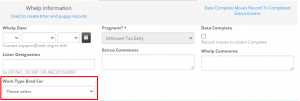
- Enter Work Type Bred For – The type entered will be populated automatically to the puppies. This can be edited on the individual dog record as needed. Later, if the dog is successful in another work type, edit that individual’s work type accordingly. If the dog was rejected and not successful in another work type, leave the original work type. Please select a primary work type (rather than ‘Unknown’). This allows IWDR to search data more effectively.
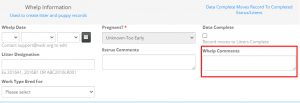
- Enter Whelp Comments – Enter as much detail about whelp to refer to when needed, behavior of Dam during whelp, complication details, placentas eaten, etc.
- Enter Whelp Quality details – Enter Whelp Quality details in the [Estrus & Whelps, Edit] screen (the column to the right of the pink column).
a. Select the Whelp Quality from the drop-down menu that best matches your whelp
b. If ended in C-Section (caesarean section), check box below
c. Record the Length of Whelp/Hrs – Starts at tail arch contraction-end last pup born
d. Check any boxes that apply to track complications
e. Enter any details in the Whelp Comments – The more details that can be entered the better to track history/data with each brood.
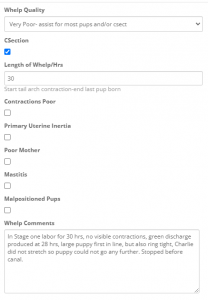
- Once these fields are populated and the record is saved, this record will disappear from the [Estrus & Whelps], Edit and will appear on the [Enter Puppies/Edit Whelp Info] or the [Litters / Enter Puppies] Quick link menu
0 out of 5 stars
| 5 Stars | 0% | |
| 4 Stars | 0% | |
| 3 Stars | 0% | |
| 2 Stars | 0% | |
| 1 Stars | 0% |